


Straightaway Powered by Mapbox
3.384.00 Reviews
App Specs
- Version
- 5.3.1
- Updated On
- License
- Free
- Downloads
- 50,000+
- Developer
- Straightaway, LLC
- Categories
- Maps & Navigation
- Platform
- Android
Screenshots
 Analysis by AppCompare
Hey there! Today, I want to dive into an app that's been buzzing around my phone lately – Straightaway Powered by Mapbox. If you're anything like me, navigating through city streets or planning a delivery route can sometimes feel like solving a complex puzzle. But fear not, because this app might just be the solution we've been looking for. Let’s get into it!
Where a steady connection matters
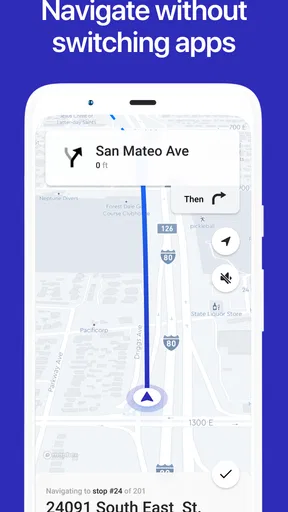
Route planning feels most useful when I have several stops to make and need a sensible order rather than a string of separate searches. That is the problem Straightaway is built around: it helps organize a multi-stop journey and guides me along it with turn-by-turn directions. The key practical point is that planning and navigating are connected parts of one workflow, not just a map with pins. I can work out a route first, then focus on the next leg while travelling.
Connectivity shapes how comfortable that workflow feels. If I’m starting a trip in a place with a reliable mobile connection, I can plan and follow the route with fewer interruptions. In a basement garage, a rural stretch, or a crowded area where service is unreliable, I would be more cautious about depending on any connected navigation app. I don’t treat Straightaway as a substitute for preparation: before leaving, I check that the route and addresses are ready, and I keep a fallback plan for important journeys.
That distinction matters for delivery work. A driver may have a list of addresses from a dispatch message, a customer call, or a paper note, and the hard part is often making the stops manageable rather than finding one destination. Straightaway is a better fit for that kind of day than for a simple trip across town. For a single destination, a familiar general-purpose map may be quicker to open; when the day involves a sequence of stops, route organization becomes the more valuable part.
Getting Started with Straightaway
The first thing I noticed when I launched Straightaway Powered by Mapbox was its clean and intuitive interface. The app greets you with a straightforward dashboard, making it super easy to get started. Whether you’re managing a small delivery business or just trying to optimize your daily commute, this app tailors itself nicely to your needs.
Setting up your account is a breeze. Just a few taps, and you’re ready to go. What really caught my attention was how seamlessly it integrates with your existing maps and contacts. You can import addresses directly from your phone’s contact list or enter them manually if you prefer.
Turning a stop list into a usable trip
A good way to test a route planner is to give it the sort of messy list people actually have: a few addresses copied from messages, one destination saved in contacts, and a stop that may need to wait until later. The useful habit is to clean up the list before setting off. Check street names and unit details while you still have time, and make sure each address belongs to the right person or job. A route optimizer can order the locations it receives, but it cannot make an incomplete address reliable.
Worth Reading Before You Choose

EA SPORTS FC Mobile 26 Is a Bigger Football Game, but It Takes Time

Flipboard Shows What News Apps Must Do Beyond the Feed

Switching to Android Auto Means Rethinking Your Driving Routine

Google Calendar Makes a Crowded Week Easier to Manage

Ludo King Makes the Most of the Minutes Between Plans

Baby Panda World Brings Quick Play to Modern Phones, but Its Game Library Feels Busy
For a small business, I would treat the planned route as a working plan, not a promise that every stop will happen on schedule. A customer might not be available, a loading area might be blocked, or a job may take longer than expected. If a stop becomes impossible, pause and reassess the remaining route instead of blindly following an order that no longer matches the day. This is a practical trade-off of optimization: a mathematically convenient sequence still needs a human to account for opening hours, urgency, parking, and the reason for each visit.
Contact import can save typing when a destination is already in the phone, while manual entry is useful for one-off addresses that should not become permanent contacts. I would choose between those methods deliberately. A saved contact is convenient for repeat visits, but an old or shared contact entry can point to the wrong address; manual entry takes longer, yet gives me a chance to verify a temporary delivery location. That small check is especially worthwhile when two customers have similar names or a building has multiple entrances.
Features That Stand Out
Now, let’s talk features. One of the standout aspects of this app is its dynamic routing algorithm. It’s designed to adjust your route in real-time based on current traffic conditions. This means you can avoid those pesky traffic jams and get to your destination faster. Who doesn’t love saving time?
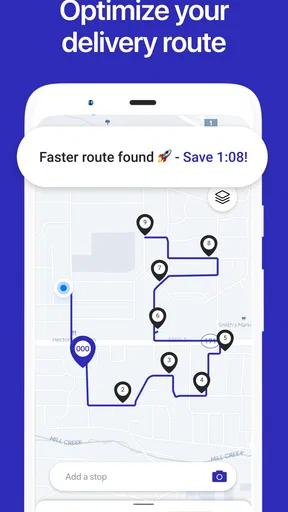
Another feature that deserves a shoutout is the multi-stop route optimization. For those managing deliveries, this is a game changer. You can input multiple addresses, and the app will calculate the most efficient route for you. It’s like having a personal assistant who’s a genius with directions.
Plus, if you’re into visual data, the app offers a nifty map view powered by Mapbox. It’s detailed, responsive, and makes navigating through your route a visual pleasure.
On the road: attention, battery, and changing plans
For a realistic workday, imagine leaving home with parcels for several neighborhoods, then receiving a message that one customer needs to change the drop-off point. The best time to handle that change is while parked, not while approaching a junction. I would stop safely, review the destination, and decide whether the new address belongs in the current route or should wait until a later run. The app can help with the route sequence, but the driver remains responsible for safe decisions and for checking that the revised plan makes sense.
On a long day, navigation is also a phone-use problem. A bright map screen, active directions, and mobile data can all make a phone feel more demanding than it does at home. I’d begin with a charged device, use a secure mount, and avoid repeatedly switching between apps while moving. If the phone is needed for calls, delivery proof, or work messages as well as navigation, a charging plan matters more than squeezing in one extra feature. These are ordinary precautions, but they make a multi-stop tool more dependable in practice.
Traffic-aware routing can be helpful, but I wouldn’t assume that every suggested change is automatically the best choice. A familiar main road may be easier to drive than a narrow shortcut, especially in a van or during a busy period. If the route appears to send me somewhere awkward, I’d use judgement rather than treating the suggested path as an instruction that must be followed. Route efficiency is useful only when it remains practical for the vehicle, the road, and the purpose of the stop.
User Experience: Smooth and Intuitive
Let’s be honest, nobody likes an app that’s a pain to use. Thankfully, Straightaway delivers on the user experience front. The interface is simple, yet effective. Everything’s where you expect it to be, and the learning curve is practically nonexistent.
The app runs smoothly on both Android and iOS devices, and I didn’t encounter any crashes or bugs during my use. It’s evident that a lot of thought has gone into making this app as user-friendly as possible.
What to do when the route stops being straightforward
Navigation is most valuable when the plan survives ordinary disruptions, but no route can remove the need to adapt. If a direction arrives late, the connection drops, or a destination turns out to be inaccessible, I would pull over before making changes and confirm the remaining stops. I would not rely on an assumed offline mode; before travelling through a known low-signal area, I’d make sure I can still identify the next address and keep the relevant details available in a safe, practical way.
There is also a difference between a route that is technically complete and one that is ready to use. Before starting, I’d check for duplicate stops, missing apartment or suite information, and locations that need a particular arrival order. If two visits have fixed timing, I would plan around those constraints rather than expect the app to understand the reason one stop must come first. A few minutes of review can prevent a much longer detour.
For someone who drives the same circuit repeatedly, it may be tempting to accept the same route without looking at it. I’d still scan the route each time. Road closures, traffic, and changed customer instructions can make yesterday’s efficient order a poor fit today. Straightaway can reduce the mental effort of arranging many addresses, but it does not replace checking whether the route matches current priorities.
Who gets the most from a multi-stop planner
I see the strongest case for Straightaway with independent couriers, service workers visiting several clients, and small teams that need to organize a day of stops without turning every address into a separate navigation search. It can also suit someone handling errands across town, such as collecting an order, dropping off a package, and visiting a relative on the same outing. The benefit grows with the number of destinations and the inconvenience of backtracking.
By contrast, a commuter who travels between the same two places may not need route optimization at all. A general navigation app is often the simpler choice for a single destination, familiar traffic information, or exploring nearby places. Someone who needs dispatch management, shared fleet oversight, customer notifications, or detailed business reporting should also check carefully that a route-focused app meets those broader needs; planning stops is not the same thing as managing an entire operation.
Compared with entering destinations one by one in a standard maps app, Straightaway’s appeal is the emphasis on organizing a sequence. The trade-off is that a specialized route planner may not be the only map tool a driver wants. I would use it for building the stop order, while keeping a familiar alternative available for a one-off search or a situation where I prefer its map information. That division of labor is more realistic than expecting one app to be best at every navigation task.
Pricing and Accessibility
On the pricing side of things, Straightaway offers a few different options. There’s a free version that gives you a good taste of the app’s capabilities, but if you’re serious about route optimization, the paid plans offer advanced features that are well worth the investment.
The subscription plans are competitively priced, and considering the time and fuel you could save with this app, it could easily pay for itself in no time. Plus, the app is available for both Android and iOS, so you can enjoy its benefits regardless of your device preference.
Trying it without overcommitting
The app is free to install, while optional in-app purchases range from $9.99 to $95.99 per item. I’d start by testing the free experience with a route similar to a real day, rather than deciding from a short demo with only two nearby stops. That reveals whether entering addresses, checking the sequence, and following directions fits the way I actually work. Before buying anything, I’d also check which feature or limit matters to me, since a paid option is only useful if it solves a problem I regularly have.
Straightaway is rated for Everyone, and its current version is 5.3.1, with Android 8.0 or later required. It comes from Straightaway, LLC. Those details make it straightforward to check basic device compatibility, but the more important personal question is whether I will use multi-stop planning often enough to justify learning another navigation workflow. A free install is a low-pressure way to answer that for myself.
Data-conscious habits for route planning
Because connected navigation can involve active use of mobile data, I would avoid assuming that a long day of directions will have no effect on my data allowance. The sensible approach is to check my phone’s data use after a typical trip and adjust my habits if needed. I’d also avoid adding personal details that are not necessary to identify a stop, particularly when entering addresses for someone else. Keeping a route list focused on the information needed for the journey makes it easier to review and less cluttered.
Connectivity can vary from one stop to the next, so I’d make route preparation part of the departure routine: confirm the addresses, check the first leg, and make sure the phone has enough battery for the drive. If I know I’ll be working in areas with weak reception, I would not make the app my only source of essential delivery details. This isn’t a criticism unique to Straightaway; it is a practical limit of relying on a phone-based connected workflow while moving around.
Final Thoughts
All in all, I’ve been pretty impressed with Straightaway Powered by Mapbox. It’s packed with features that make it invaluable for anyone looking to streamline their travel or delivery routes. Its intuitive design and powerful functionality make it a top choice in the route optimization space.
Whether you’re a delivery driver, a business owner, or just someone who loves efficient travel, this app is definitely worth checking out. Give it a try and see how much easier your journeys can be. Happy navigating!
My connectivity verdict
Straightaway makes most sense when I can prepare a list of stops, get a dependable connection for route planning and directions, and then focus on driving rather than repeatedly deciding where to go next. Its multi-stop emphasis is a real advantage over opening a general map for every address, especially on delivery or service days. The limits are just as practical: it cannot correct bad address details, guarantee that a suggested route suits every vehicle, or remove the need for a plan when reception is poor.
My recommendation is to try it if your regular journeys involve several destinations and you want help arranging them into a usable run. If your trips are usually one stop at a time, or your work depends on tools beyond route planning, a familiar maps app or a broader business system may suit you better. For me, the deciding question is simple: will organizing multiple stops save enough attention and backtracking in my day to make another connected app worthwhile?
Pros
- User-friendly interface for quick navigation.
- Real-time traffic updates enhance efficiency.
- Offline maps available for no-signal areas.
- Customizable routes to suit personal needs.
- Integrates seamlessly with other apps.
Cons
- Limited features in the free version.
- Occasional GPS signal drop in dense areas.
- Consumes significant battery during use.
- Requires constant updates for optimal performance.
- Some minor bugs affect app stability.
FAQs for Straightaway Powered by Mapbox
What is Straightaway Powered by Mapbox, and how does it work?
Straightaway Powered by Mapbox is a navigation app designed to optimize delivery routes for drivers. By using advanced mapping technology from Mapbox, the app efficiently plans routes, taking into account real-time traffic conditions and other variables. Users input their delivery addresses, and the app generates the most efficient path to minimize drive time and fuel usage.
Is Straightaway Powered by Mapbox available on both Android and iOS?
Yes, Straightaway Powered by Mapbox is available for download on both Android and iOS platforms. This ensures that users can access the app regardless of their device type, providing a seamless experience across different operating systems. Links to download the app can be found on our website, ensuring easy access for all users.
What are the main features of Straightaway Powered by Mapbox?
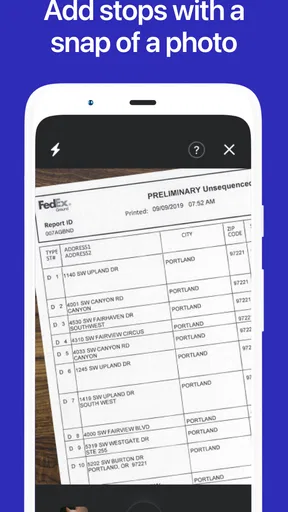
The app offers several key features, including real-time traffic updates, route optimization, and the ability to import addresses directly from spreadsheets or other documents. It also provides voice-guided navigation and a user-friendly interface that allows drivers to manage multiple deliveries efficiently. These features combine to help users save time and reduce stress during their delivery routes.
Are there any costs associated with using Straightaway Powered by Mapbox?
While Straightaway Powered by Mapbox offers a free version with basic functionalities, there are premium features available through a subscription model. Users can choose to upgrade for access to advanced features such as unlimited stops and enhanced route optimization. Pricing details can be found within the app or on the official website.
How does Straightaway Powered by Mapbox handle data privacy?
Straightaway Powered by Mapbox is committed to ensuring user data privacy and security. The app collects only necessary information to optimize routes and improve user experience. All data is encrypted and stored securely, and users have control over their data settings. The app adheres to industry standards and regulations to safeguard user information.


